


 April 2025 Newsletter
MobiWork Momentum: The Latest Updates
Exciting new mobile-first and cloud-based features that keep your field service team movingExport Multiple Work Orders PDFs:
MobiWork added new actions in the work orders list page to easily export the PDF documentation (with or without the corresponding invoice) of multiple work orders: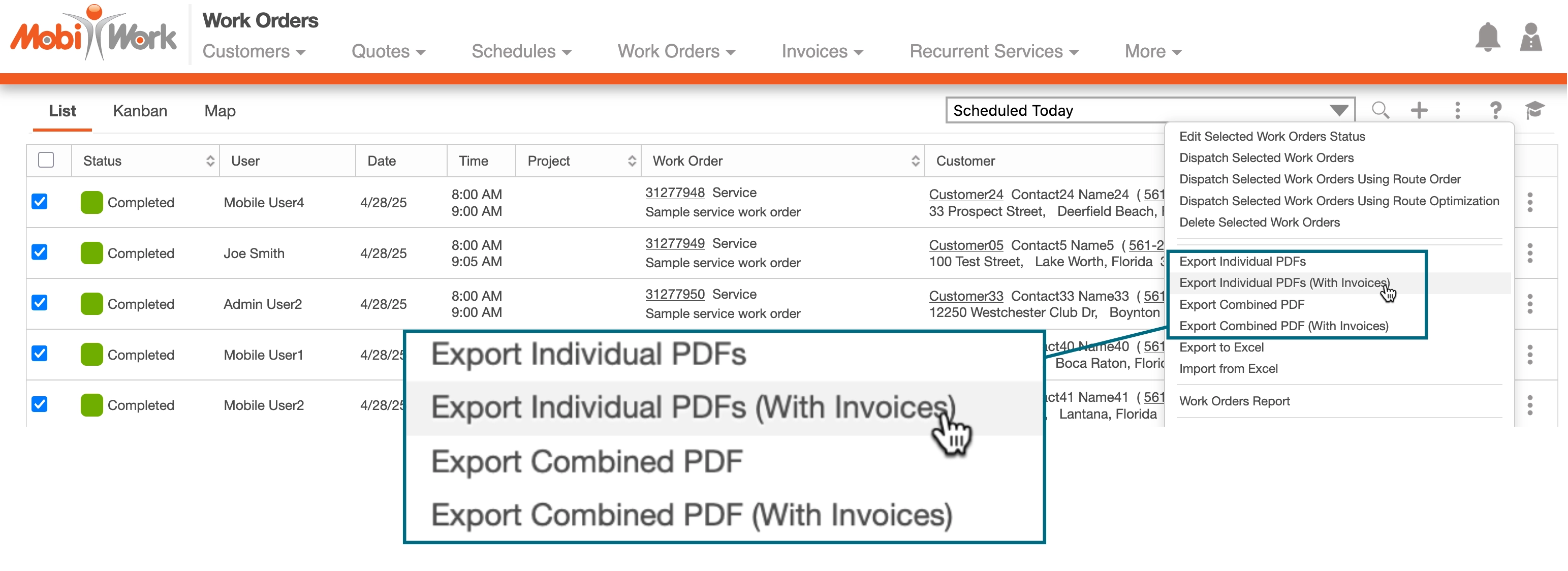
- Export Individual PDFs creates a zip archive file that contains the individual PDF files of the selected work orders
- Export Individual PDFs (With Invoices) creates a zip archive file that contains the individual PDF files (including the invoice) of the selected work orders
- Export Combined PDF creates one single PDF file that combines all the PDF of the selected work orders
- Export Combined PDF (With Invoices) creates a single PDF file that combines all the PDF and invoice of the selected work orders
These actions are typically used to save the content of the work orders prior to deleting them. They can also be used in the scenario where a physical document must be provided to a customer.
Saved Search Updates:
MobiWork introduced the following new capabilities to streamline the usage and management of the saved search:
- MobiWork displays who created the saved search, when and the last time the saved search was updated
- A saved search name can now be changed (simply click on Edit and change the name)
- A private saved search can now be made available to all users and vice-versa (simply click on Edit and check/uncheck the "Search Available to all Users" checkbox).

Export Customers:
MobiWork is an open solution that allows you to easily export all your data at any time. If you prefer to limit who can download your entire customers list, MobiWork has introduced a new permission to authorize or not the following actions for a user: 
If you would like to use this new permission, please reach out to our customer success team so that they can set it up for you.
New Connector: HubSpot
Connecting marketing campaigns and leads management to your field service management software solution
We’re excited to introduce our new connector that allows you to integrate HubSpot with your MobiWork account seamlessly!
By combining HubSpot’s marketing campaigns and prospects management capabilities with the power of MobiWork, you can enhance productivity, improve customer engagement, and drive business growth in one place.
Why You Need a Pool Services Software Solution
Part 3
This is the third part of our 3-part series. Check out Part 1 and Part 2 of the series to see the previous tips.
Managing a pool and spa service business involves juggling multiple tasks at once, from keeping track of individual maintenance schedules to ensuring efficient routes and managing inventory.
As your business grows and the number of pools you service increases, the challenges of manual tracking and coordination can become overwhelming.
That’s where pool and spa services management software, like MobiWork, comes in.

© 2010–2026 MobiWork LLC. All rights reserved.